Connect your AI assistant

Hand your AI assistant a receipt, an old spreadsheet, or a question. It logs the work in omido, charts your costs, and answers from your garage, in the app you already use.

For Trunk members. omido works fully without it.

What your assistant can do in omido

  • Diagnose a problem

    Describe what you’re seeing, or attach a photo. It checks your garage’s own history before it answers.

  • Bring in old records

    Paste a spreadsheet, a stack of receipts, or years of service history. No cap on how many rows it brings in.

  • Log something new

    A receipt, an invoice, a quote. It creates the record. No cap on how many you add.

See it

Real conversations, on a sample account
Set it up

Three steps, one time

  1. 1

    Create an access key.

    In the app, open Trunk, then AI assistant. It’s shown once, so copy it.

  2. 2

    Add omido to your assistant.

    Paste the address and your key into its connector settings. Pick yours for the exact taps.

    Connection address
    https://api.omido.app/mcp
  3. 3

    Ask it to list your vehicles.

    If it answers with your garage, you’re connected. If not, check the key isn’t revoked in the app.

The key is yours. Revoke it in the app anytime.

Then

Everything in your garage, working together.

It answers from your own omido records and from everything it already knows: your history, your costs, what’s due, and what to do next. Ask in your own words.

Or start with a line from the app

Tap any line to copy it. Each names omido, so your assistant picks the right connector. To keep the original receipt, add it in the app.

Set up Claude

Free plan, Pro, or Max. Set it up on the web or desktop, then it works in the Claude phone app too.

  1. Customize
  2. Connectors
  3. Add custom connector
  1. Paste the address and give it a name.
  2. Choose “No sign in” and add this header:
    AuthorizationBearer your key
  3. Press Add.
Connection address
https://api.omido.app/mcp

Seeing “Register automatically” instead of a key field? Press it, then sign in to omido.

Set up Le Chat

Mistral’s Le Chat. Free plan, Pro, or Student.

  1. Connectors
  2. Add Connector
  3. Custom MCP Connector
  1. Name it with letters and numbers only, and paste the address.
  2. Choose HTTP Bearer Token and paste your key as the token.
Connection address
https://api.omido.app/mcp

Set up Perplexity

Needs Pro, Max, or Enterprise. Set it up on the web.

  1. Account Settings
  2. Connectors
  3. Custom connector
  1. Choose Remote and paste the address.
  2. Set Transport to Streamable HTTP and Authentication to API Key.
  3. Paste your key.
Connection address
https://api.omido.app/mcp

Set up ChatGPT

Reads your garage on Plus or Pro. Logging a new receipt needs a work plan: Business, Enterprise, or Edu.

At chatgpt.com:

  1. Settings
  2. Security and login
  3. Developer mode
  1. Turn on developer mode. On a work or school plan, an admin allows it first.
  2. Create a connector, name it, paste the address, and choose OAuth. There’s no key field: ChatGPT registers itself with omido.
  3. Press Connect, then paste your key.
Connection address
https://api.omido.app/mcp

Set up Gemini

Needs Google AI Pro or Ultra, on a personal account in the United States. Google also asks that you’re 18 or over, with Keep Activity on.

At gemini.google.com:

  1. Settings
  2. Connected apps
  3. Custom apps
  4. Add a custom app
  1. Name it, paste the address, and press Next.
  2. Gemini opens omido’s own sign-in page. Paste your key there.
  3. After that, it works in the Gemini app too.
Connection address
https://api.omido.app/mcp

Set up Grok

Should work, but the connection isn’t fully tested yet.

  1. grok.com/connectors
  2. New Connector
  3. Custom
  1. Name it and paste the address. On a business or enterprise plan, an admin adds it for the team.
  2. Complete the sign-in step, then paste your key. Grok picks up what omido can do once connected.
Connection address
https://api.omido.app/mcp

Set up Claude Code

These run on your own machine, so they also keep the original file.

Takes the key directly, so there’s no sign-in step.

  1. Run this with your key in place of the placeholder.
claude mcp add --transport http omido https://api.omido.app/mcp --header "Authorization: Bearer omido_ak_YOUR_KEY"

Set up Gemini CLI

These run on your own machine, so they also keep the original file.

Adds omido with one command.

  1. Run this with your key in place of the placeholder.
gemini mcp add --transport http --header "Authorization: Bearer omido_ak_YOUR_KEY" omido https://api.omido.app/mcp

Set up Cursor

These run on your own machine, so they also keep the original file.

Adds omido as a server in your MCP config.

  1. Open ~/.cursor/mcp.json, or a project’s own .cursor/mcp.json.
  2. Add this with your key in place of the placeholder, then save.
{ "mcpServers": { "omido": { "url": "https://api.omido.app/mcp", "headers": { "Authorization": "Bearer omido_ak_YOUR_KEY" } } } }

Set up VS Code

These run on your own machine, so they also keep the original file.

Works through Copilot Chat.

  1. Open the Command Palette, run MCP: Add Server, choose HTTP, and paste the address. Or add it to your own mcp.json.
  2. The first time Copilot uses it, VS Code asks for the header value. Paste Bearer and your key.
  3. Ask in Copilot Chat.
Connection address
https://api.omido.app/mcp

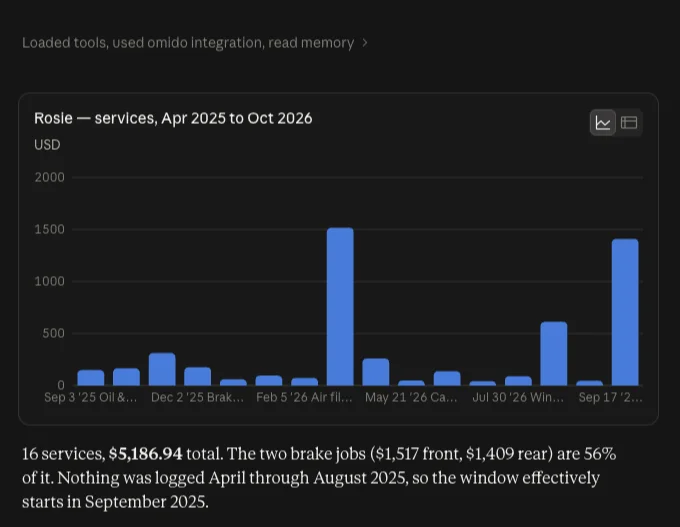
A full service history, charted from one question.

The prompt: “Make me a chart of every service on Rosie over the last year and a half: when it happened and what it cost.”

Sample account
Claude’s chart of Rosie’s 16 services from April 2025 to October 2026, with a cost summary totaling $5,186.94.

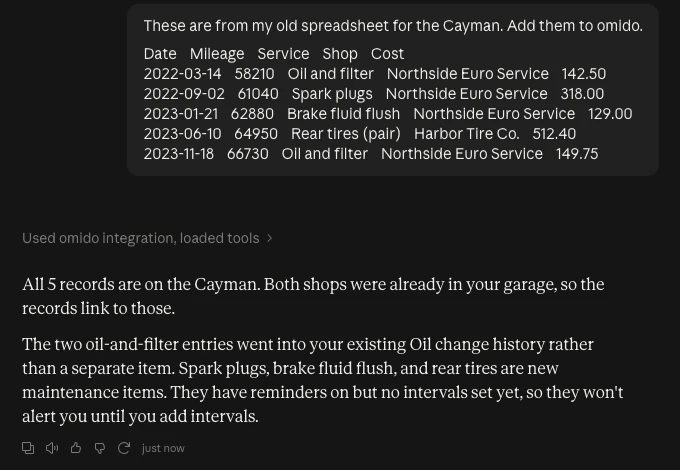
An old spreadsheet, added in one message.

5 spreadsheet rows pasted

The prompt: “These are from my old spreadsheet for the Cayman. Add them to omido.”

Sample account
Claude confirms it added all five pasted spreadsheet rows to the Cayman, matching two shops already in the garage and merging the oil changes into existing history.

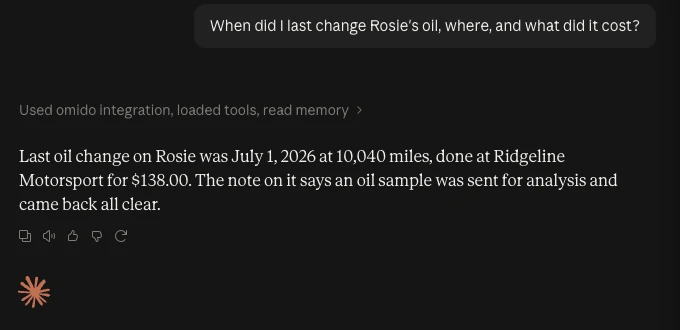
A plain question, answered on the spot.

The prompt: “When did I last change Rosie’s oil, where, and what did it cost?”

Sample account
Claude answers that Rosie’s last oil change was July 1, 2026 at 10,040 miles at Ridgeline Motorsport for $138, noting the oil sample came back clear.

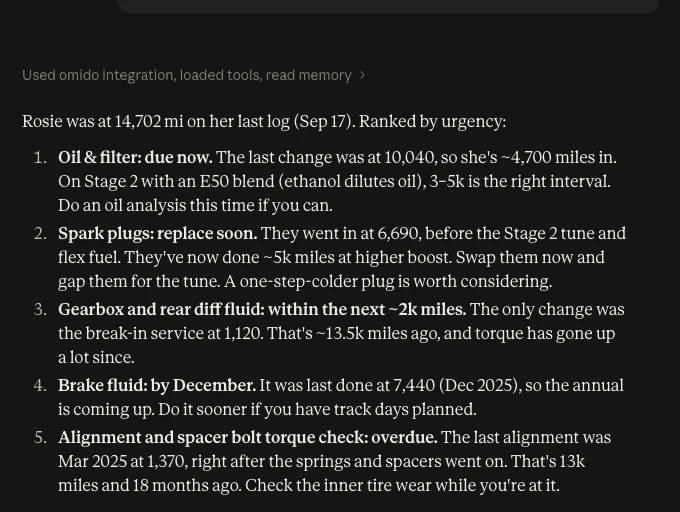
A top five maintenance list, from the vehicle’s history.

The prompt: “What’s a top 5 preventative maintenance list you’d recommend for Rosie, my 2023 BMW, based on her history in omido?”

Sample account
Claude ranks five maintenance items for Rosie by urgency, from an overdue oil change to a brake fluid service due by December.